What would a birthday party be without cute little cupcakes :)
I love cupcakes. They are so easy to make and then you can decorate them with cute little cupcake toppers. And don't you love the frosting on these? This summer I learned how to use icing tips- and it is SO EASY! I don't know why I was so scared of trying it out before- seriously... it looks nicer and is actually faster than trying to frost these bad boys with a butter knife. You've got to give it a try :)
But I digress. You came here to see paper crafts, not my baking :) So back to the toppers. Didn't they turn out adorable.
With MDS they are so easy to make. First you figure out what size you want them to be- I started with a circle that was slightly bigger than my scallop punch. Next I decorated them using my homemade Daniel Tiger DSP and the images I had found online. I wanted to add an individual touch to each of the characters- so I circled them with quotes geared towards a party (if you haven't given it a try yet, create a freeform line and attach a text box to it- the results are Grr-rific!). Then all I had to do was print them up and punch them out. And (depending on your size) you can usually get about 20 of these from a sheet.
I hope you give some customized cupcake toppers a try at your next party!
November 27, 2013
November 26, 2013
Daniel Tiger Party Favors
We had an awesome time at Elli's 3rd birthday party. I hope you are enjoying hearing all about it (at least the crafty parts of it :) )
Today I want to share with you her party favors. I had seen on Etsy some cute little fry boxes filled with goodies for a party... and I thought "Hey, I can do that." Enter MDS- you know I love it :) - and out comes these adorable little party favors. I filled them up with crayons, reminiscent of the episode where Daniel Tiger goes to the crayon factory, and then printed up booklets of coloring pages for each of the kids (PBSkids.org has some wonderful printable coloring pages available).
Here is what it looks like inside and outside before folding:
I found the fry box template online and turned it into a stamp. If you look on the inside picture you should be able to see it there lightly. In order to fill it in with the DSP I actually set the entire background to the DSP, then overlaid a Freeform layer and colored the areas outside the stamp white. I didn't do the job of a perfectionist as you can see- I figured I was going to cut it out anyway so it didn't matter. Really the only reason to remove the outside areas was to save on ink :)
Want to make your own fry boxes? Subscribe to my blog via email and leave a comment on this post- then I'll send you your own copy of the stamp I used. Hope you enjoy!
Flutterby again soon. I've got a lot more Daniel Tiger Birthday to show you :)
Today I want to share with you her party favors. I had seen on Etsy some cute little fry boxes filled with goodies for a party... and I thought "Hey, I can do that." Enter MDS- you know I love it :) - and out comes these adorable little party favors. I filled them up with crayons, reminiscent of the episode where Daniel Tiger goes to the crayon factory, and then printed up booklets of coloring pages for each of the kids (PBSkids.org has some wonderful printable coloring pages available).
I found the fry box template online and turned it into a stamp. If you look on the inside picture you should be able to see it there lightly. In order to fill it in with the DSP I actually set the entire background to the DSP, then overlaid a Freeform layer and colored the areas outside the stamp white. I didn't do the job of a perfectionist as you can see- I figured I was going to cut it out anyway so it didn't matter. Really the only reason to remove the outside areas was to save on ink :)
Want to make your own fry boxes? Subscribe to my blog via email and leave a comment on this post- then I'll send you your own copy of the stamp I used. Hope you enjoy!
Flutterby again soon. I've got a lot more Daniel Tiger Birthday to show you :)
Labels:
Daniel Tiger Party,
My Digital Studio
November 22, 2013
You can be a Tiger too...
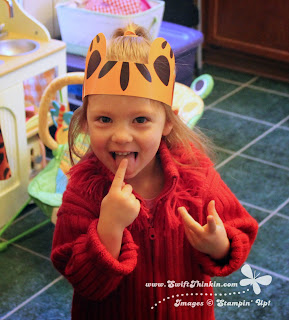
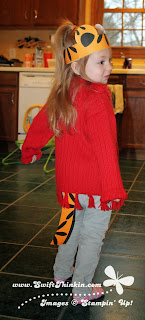
... with this cute headband and tail. Won't your little Daniel Tiger fan just love them :)
Mine sure did! She saw me making these little cuties the night before her party- and insisted on wearing hers RIGHT AWAY! The next morning it was on again way before the party started and it didn't come off without prying :) She even put it on again on Sunday too! LOL what a little cutie.
Designing these in MDS was a cinch. I just used a variety of pretty standard punch shapes- rectangles, ovals, half circles, and a flower. I let the initial version be 'messy' with the parts I wanted to cut off hanging around like this:
But then so that I could fit more on the page and not waste so much space I decided to trim the extras off. In order to do this I exported the 'messy' version to a JPEG. Then, I designed a similar layout using rectangle and circle photoboxes. I grouped them all together and placed my JPEG inside (when you group photoboxes you can add one photo to the whole collection at once). It cropped out all the mess! I was then able to ungroup them and squish them together- it even left me enough room to make a copy of the back of the headband to use as a tail. Woo Hoo! So much fun :)
I hope you enjoyed today's idea!

Designing these in MDS was a cinch. I just used a variety of pretty standard punch shapes- rectangles, ovals, half circles, and a flower. I let the initial version be 'messy' with the parts I wanted to cut off hanging around like this:
But then so that I could fit more on the page and not waste so much space I decided to trim the extras off. In order to do this I exported the 'messy' version to a JPEG. Then, I designed a similar layout using rectangle and circle photoboxes. I grouped them all together and placed my JPEG inside (when you group photoboxes you can add one photo to the whole collection at once). It cropped out all the mess! I was then able to ungroup them and squish them together- it even left me enough room to make a copy of the back of the headband to use as a tail. Woo Hoo! So much fun :)
I hope you enjoyed today's idea!
Labels:
Daniel Tiger Party,
My Digital Studio
November 19, 2013
Get Ready for the Holiday Sale!
Did you know that this year Thanksgiving is the latest it can ever possibly be? True Fact!
So if you wait until after Thanksgiving to start your Christmas shopping then you are cutting yourself short on days. So, why not take advantage of the great savings Stampin' Up! is offering and get your holiday presents off to a good start :)
The sale starts tomorrow (November 20th) and runs thru December 2nd. So pick out some awesome products and save big!
Even better- shop the first day and get 40% off one of the doorbuster items! Woo Hoo! Happy Holidays :)
November 15, 2013
Paper Stack One Sheet Wonder- Part 3
Here is the final card in this Mini One Sheet Wonder. All three cards have featured the Winter Frost Paper Stack and the Festive Flurry bundle.
After creating the first two cards you should be left with a strip of DSP that is 4.5" x 1.75". For this last card I shortened the 4.5" to be 4.25", and then I cut it length wise so I had one strip 0.75" wide and two 0.5" wide. I arranged these along the side of the card and added the two smaller snowflakes.
Top off with bling again and there you have it. Three cards from one sheet of the paper stack. And you used each of the snowflakes once as well (you should be able to cut all four from a half sheet of cardstock).
So what are you waiting for? It is time to get started on you Christmas cards now too! There are two different paper stacks to choose from- and then just add stamps of your choice. Enjoy!
After creating the first two cards you should be left with a strip of DSP that is 4.5" x 1.75". For this last card I shortened the 4.5" to be 4.25", and then I cut it length wise so I had one strip 0.75" wide and two 0.5" wide. I arranged these along the side of the card and added the two smaller snowflakes.
Top off with bling again and there you have it. Three cards from one sheet of the paper stack. And you used each of the snowflakes once as well (you should be able to cut all four from a half sheet of cardstock).
So what are you waiting for? It is time to get started on you Christmas cards now too! There are two different paper stacks to choose from- and then just add stamps of your choice. Enjoy!
November 13, 2013
Paper Stack One Sheet Wonder- Part 2
Glad you fluttered back here to see card #2 from this mini One Sheet Wonder. Once again, it features the Winter Frost Paper Stack and the Festive Flurry bundle.
So, after making the first card you are still left with a piece of DSP that is 4.5" x 3.25". For the next card you are going to cut a strip that is 4.5" x 1.5", and then take said strip and cut it into three squares (all 1.5" x 1.5").
All you have to do then is tile them on a strip of Island Indigo (5.5" x 1.75") and add the second largest snowflake. Make sure to top it off with some bling again :)
For all the snowflakes in this Mini One Sheet Wonder series I used the Silver Encore Pad. It adds a nice shine to the flakes. Here is a close-up
Isn't that pretty. I do want to point out though- when adding rhinestones on top of this ink you have to use a glue dot underneath. The adhesive that comes with them just is not sticky enough to adhere to this particular type of ink. However, if there is a large open white area within the stamped image it will be just fine.
Stay tuned for card #3!
So, after making the first card you are still left with a piece of DSP that is 4.5" x 3.25". For the next card you are going to cut a strip that is 4.5" x 1.5", and then take said strip and cut it into three squares (all 1.5" x 1.5").
All you have to do then is tile them on a strip of Island Indigo (5.5" x 1.75") and add the second largest snowflake. Make sure to top it off with some bling again :)
For all the snowflakes in this Mini One Sheet Wonder series I used the Silver Encore Pad. It adds a nice shine to the flakes. Here is a close-up
Isn't that pretty. I do want to point out though- when adding rhinestones on top of this ink you have to use a glue dot underneath. The adhesive that comes with them just is not sticky enough to adhere to this particular type of ink. However, if there is a large open white area within the stamped image it will be just fine.
Stay tuned for card #3!
November 11, 2013
Paper Stack One Sheet Wonder- Part 1
Have you seen the paper stacks that Stampin' Up! offers? They are these little paper pads cut at 4.5" x 6.5". That makes them the perfect size for a photo mat. But what else can you do with them? Well, I decided to revamp the idea of a One Sheet Wonder on these little babies. So now you can get 3 cards per sheet... and with 48 sheets per stack that is a lot of cards!
My cards feature the Winter Frost Paper Stack and the Festive Flurry bundle. I just love using snowflakes for Christmas cards. They are so pretty :) Here is the first of the three layouts:
For this card I cut the piece from the paper stack in half (so it is 4.5" x 3.25"). Then I dressed it up with the large snowflake and the Christmas greeting from the Tags 4 You stamp set. And to top it off I added a little bling :)
Flutterby again soon to see cards 2 & 3!
My cards feature the Winter Frost Paper Stack and the Festive Flurry bundle. I just love using snowflakes for Christmas cards. They are so pretty :) Here is the first of the three layouts:
For this card I cut the piece from the paper stack in half (so it is 4.5" x 3.25"). Then I dressed it up with the large snowflake and the Christmas greeting from the Tags 4 You stamp set. And to top it off I added a little bling :)
Flutterby again soon to see cards 2 & 3!
Subscribe to:
Posts (Atom)